Depth-VSLAM on Qualcomm QCS6490: Feasibility and Resource Utilization Analysis
Deploying SLAM on embedded platforms remains a challenge. In this article, we evaluate whether the Qualcomm® QCS6490 platform can reliably support Depth VSLAM for AMR and smart vision applications.
By leveraging ROS 2 VSLAM nodes provided in the QIRP SDK, we aim to measure system feasibility, performance, and identify optimization points for real-world deployment.
QIRP SDK and VSLAM Basics
The Qualcomm® Intelligent Robotics Product (QIRP) SDK is a development kit launched by Qualcomm for embedded and robotics applications.
This SDK supports running ROS 2 nodes on various Qualcomm platforms (such as QCS6490). It integrates sensors like cameras and IMUs, and handles image processing and AI inference tasks.
In QIRP SDK version 1.1, Qualcomm provides a set of reference ROS 2 sample nodes.
These include a Depth VSLAM module that demonstrates how to integrate depth images and IMU data with AMR to achieve real-time localization and mapping (SLAM).
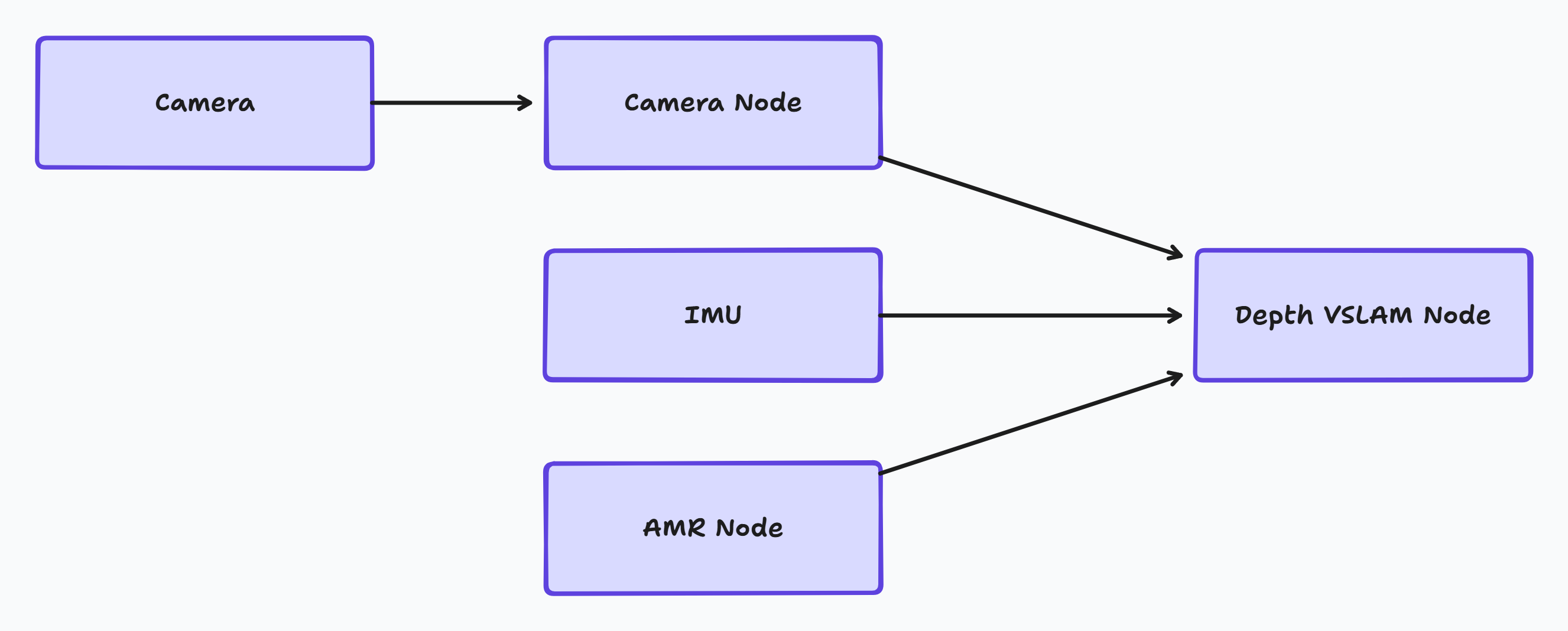
This diagram shows how image and sensor data are processed in the QIRP SDK:
The camera captures raw image data and sends it to the Camera Node for initial processing. The processed image data is then passed to the Depth VSLAM Node. Simultaneously, motion data from the IMU and AMR Node are also fed into the VSLAM node. The Depth VSLAM Node fuses all these inputs to perform real-time localization and mapping.
Setup and Launch Guide
To run Depth VSLAM nodes on QCS6490, we need to set up the development environment according to the QIRP SDK guidelines. The complete installation and startup process is as follows:
-
Setting up the development environment
Follow the Qualcomm QIRP SDK installation instructions.
You can also refer to our documentation How to Setup QL601 Development Environment for system image building and toolchain configuration steps.
-
Initializing the ROS 2 workspace
Use the source command to load the corresponding ROS 2 workspace and environment variables.
-
Activating sensor nodes
Launch camera drivers and IMU data publishing nodes as data sources for VSLAM.
-
Starting the Depth VSLAM node
Launch the Depth VSLAM ROS 2 node according to the sample script provided in the SDK.
-
Providing
/odomdata sourceThe Depth VSLAM node relies on
/odommessages from the control system.If no physical AMR is connected on-site, we can simulate it through:
-
Using Gazebo to create a virtual environment and send
/odommessages. -
Creating a ROS 2 node to simulate message publishing.
Note
All data streams (camera, IMU,
/odom) need to be properly time-synchronized to ensure normal operation of the SLAM module. -
-
Monitoring output results
Use
ros2 topic echoor RViz to view the map construction status and localization results in real-time.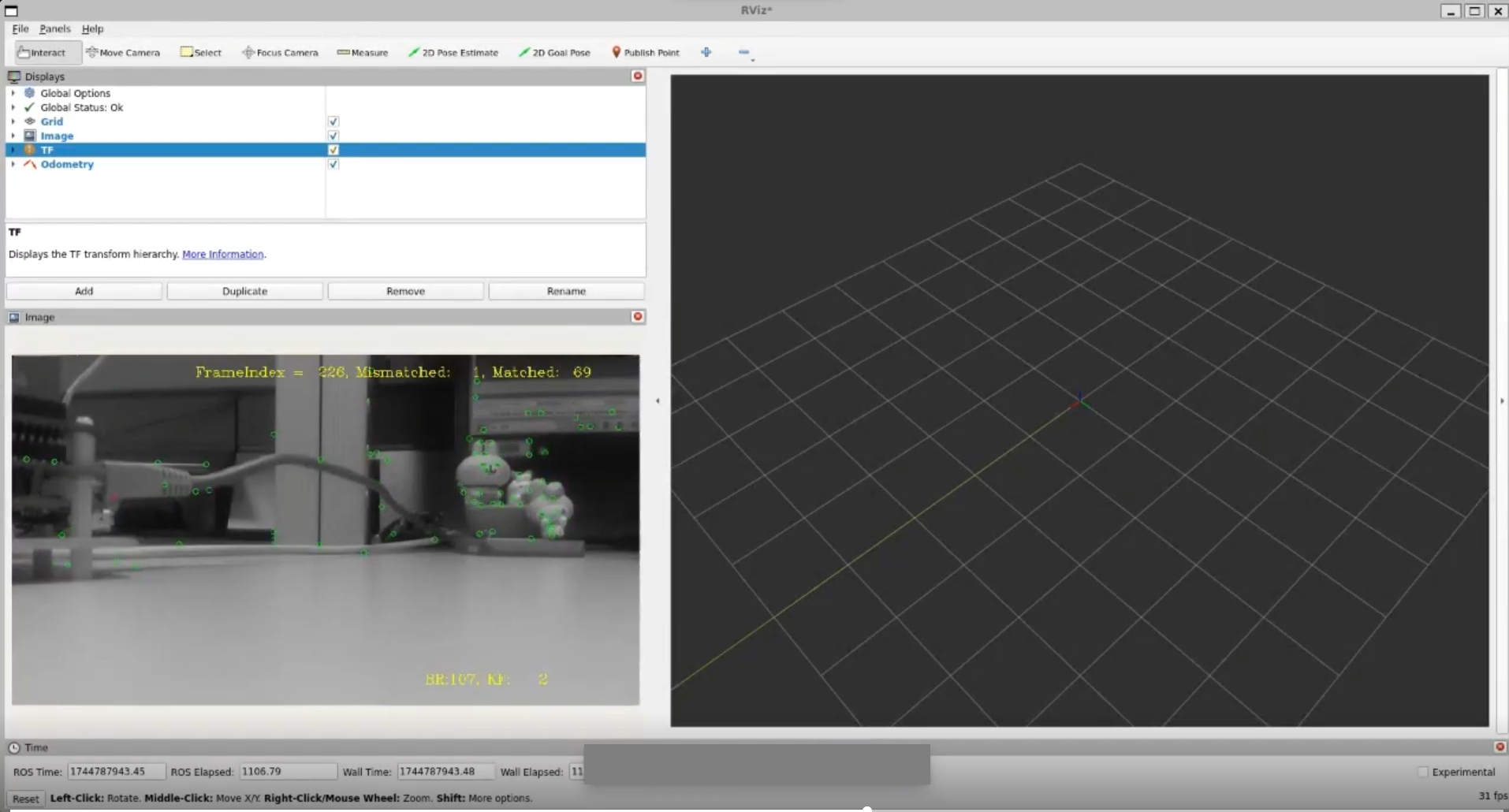
Resource and Performance Data
We can monitor system resources using the QRB-ROS-SYSTEM-MONITOR node tool provided by Qualcomm.
Observed metrics include:
-
CPU utilization
-
Memory usage
Comparing Performance with RealSense Camera
To analyze image transmission performance across different platforms, we compared the performance of QCS6490 and NVIDIA® Orin NX with RealSense cameras.
We covered the following two scenarios:
| Scenario | Metric | Orin NX | QCS6490 |
|---|---|---|---|
| RGB camera only | CPU utilization | 2.61% | 6.75% |
| Memory usage | 50 MB | 72.5 MB | |
| RGB + depth image | CPU utilization | 12.2% | 24.32% |
| Memory usage | 62 MB | 76.5 MB |
Although the QCS6490 has higher CPU utilization, its resource consumption is stable with minor RAM differences.
This demonstrates that even on resource-constrained embedded platforms, the QCS6490 can reliably process image data streams.
In actual deployment, this stability helps ensure reliable long-term system operation. It reduces the risk of anomalies caused by resource bottlenecks, and improves overall platform usability and development efficiency.
VSLAM Resource Usage
Due to fundamental differences in algorithm design, sensor inputs, and topic naming between Qualcomm and NVIDIA's SLAM algorithms, we did not conduct a direct cross-platform comparison of VSLAM functionality.
However, the resource changes when running VSLAM nodes on QCS6490 are as follows:
| Metric | Before depth-vslam | After depth-vslam |
|---|---|---|
| CPU utilization | 0.55% | 63.12% |
| Memory usage | 1136.52 MB | 1287.45 MB |
After launching VSLAM, CPU utilization increased from 0.55% to 63.12%.
Memory usage rose from 1136.52 MB to 1287.45 MB, an increase of approximately 150 MB.
The system maintained operation during the execution period without significant anomalies.
Conclusion
Test results show that the Depth VSLAM module can operate on the Qualcomm® QCS6490 platform.
Overall resource usage and stability meet the requirements for embedded applications.
The testing process primarily focused on integrating ROS 2 nodes and validation in physical environments. This covers aspects such as sensor driver activation, data stream synchronization, and performance observation.
When testing with RealSense cameras, the QCS6490 showed promising performance in processing high-resolution RGB and depth images. This provides valuable reference data for developers.
If you're looking to deploy these capabilities in real-world applications, we recommend evaluating our QL601 platform. Based on the QCS6490 SoC, QL601 combines efficient performance with rich I/O and expansion options. It's a reliable and scalable choice for edge AI scenarios including autonomous mobile robots, smart kiosks, and computer vision retail systems.